Antyodaya Saral Haryana - Registration & Login, Status Check
परिवार पहचान पत्र (PPP) सेवा हरियाणा सरकार ने हाल ही में शुरू की है, जिसको हम family ID के नाम से भी जानते हैं। इसके जरिए हरियाणा के सभी परिवार अपना रजिस्ट्रेशन कर सभी सरकारी योजनाओं का सीधा लाभ ले सकते हैं।
Quick Access
Registration process for Haryana Family ID
हरियाणा फैमिली ID के लिए रजिस्टर करने के लिए, कृपया इन स्टेप्स का पालन करें:
- ppp-office.haryana.gov.in पर जाएं।
- "Citizen Login" चुनें और अगर रजिस्टर्ड नहीं है, तो "No" विकल्प चुनें।
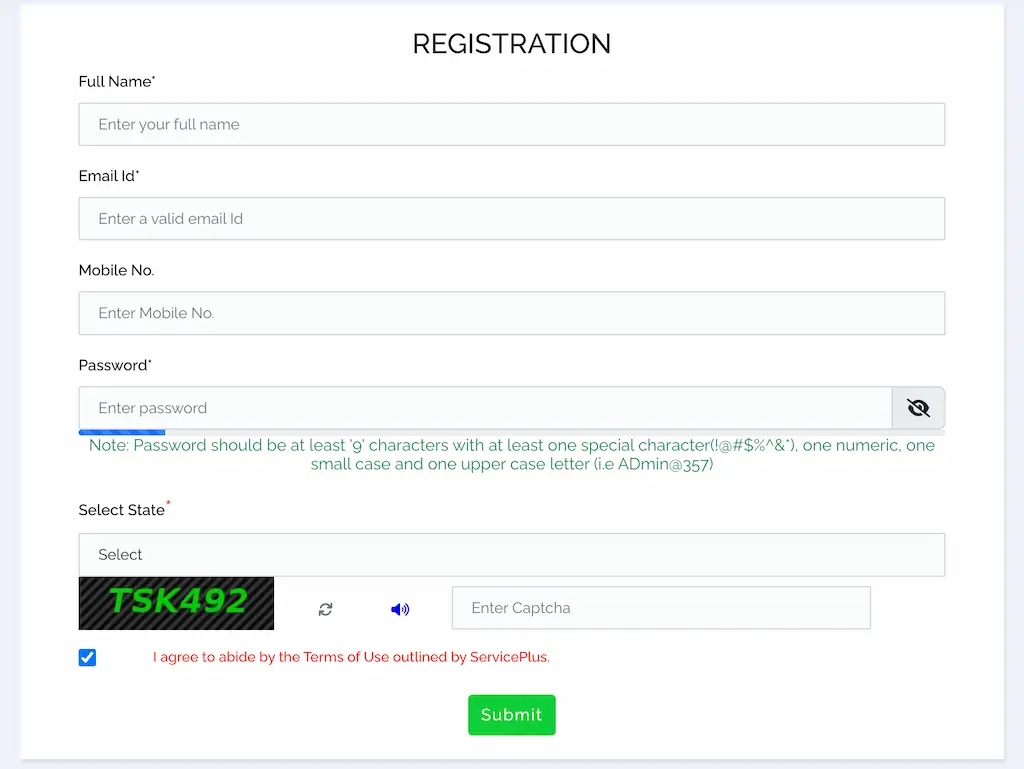
- परिवार के मुखिया का आधार नंबर डालें और आधार को वेरिफ़ाई करने के लिए प्राप्त OTP डालें।
- वेरिफिकेशन के बाद अपनी पर्सनल जानकारी भरें: नाम, जन्म तिथि, जेंडर, वैवाहिक स्थिति, जन्म स्थान, मोबाइल नंबर, ईमेल ID, जाति श्रेणी (SC/ST/OBC) और सालाना आय और आय का स्रोत आदि।
- परिवार के सदस्यों की जानकारी भरें: पिता की जानकारी, माता की जानकारी, जीवनसाथी की जानकारी, घर का पूरा पता, संपति, और बच्चों के आधार, नाम, जन्म तिथि आदि के साथ।
- डॉक्यूमेंट अपलोड करें: सभी सदस्यों के आधार कार्ड, उम्र का प्रमाण, वोटर ID, पते का प्रमाण पत्र, आय, जाति का प्रमाण पत्र, बैंक पासबुक और PAN कार्ड (अगर लागू हो)।
- जानकारी "Submit"" करने के बाद। आपको एक टेम्पररी family ID नंबर मिलेगा (जो 'T' से शुरू होगा)। इसे भविष्य के लिए नोट कर लें।
Haryana Family ID Login Process
PPP हरियाणा पोर्टल पर अपने अकाउंट को एक्सेस करने के लिए, इन स्टेप्स को फॉलो करें:
- PPP हरियाणा की ऑफिशियल वेबसाइट ppp-office.haryana.gov.in पर जाएं।
- होमपेज पर "Citizen Login" ऑप्शन पर क्लिक करें।
- "Yes" को सेलेक्ट कर, अपनी फैमिली ID डालें और सर्च करें।
- अपनी आईडी वेरीफाई करने के लिए रजिस्टर्ड मोबाइल नंबर पर प्राप्त OTP को भरें और Login करें।
How to Track Application / Appeal?
You can track your application status without logging in:
- Go to saralharyana.gov.in.
- Click "Track Application / Appeal" on the homepage.
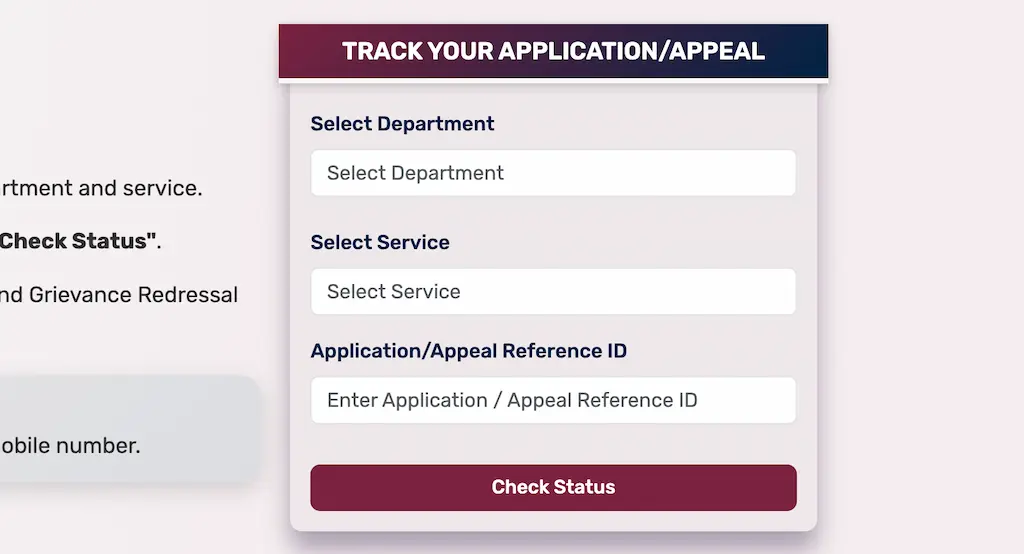
- Enter your Department, Service Name, and Application Reference ID.
- Click "Check Status" to view current progress – Submitted, Under Review, Approved, or Rejected.
How to Download the Certificate?
- Log in to your SARAL Haryana account.
- Go to "View Status of Application" from the menu.
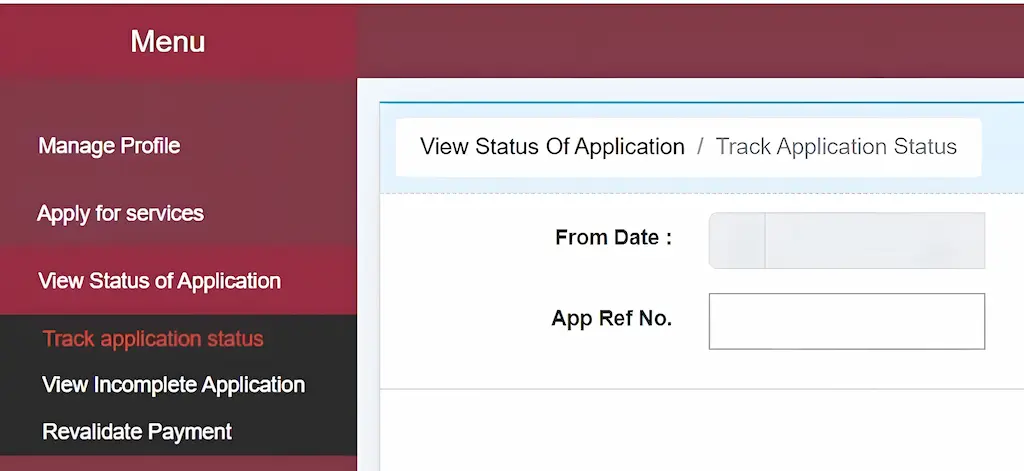
- Find the approved application and click "Delivered" > "Certificate" > Download Certificate.
- Save the certificate – it carries a digital signature and is valid for official use.
How to Book an Appointment for SARAL Kendra?
Follow the steps below to generate your token number on the Saral Haryana portal:
- Go to saralharyana.gov.in. Click > "Book Appointment for SARAL Kendra".
- Enter your Family ID and click "Get Data" to auto-fill your details.
- Select your Gender, enter your Mobile Number and Address.
- Choose your District and nearest Saral Kendra.
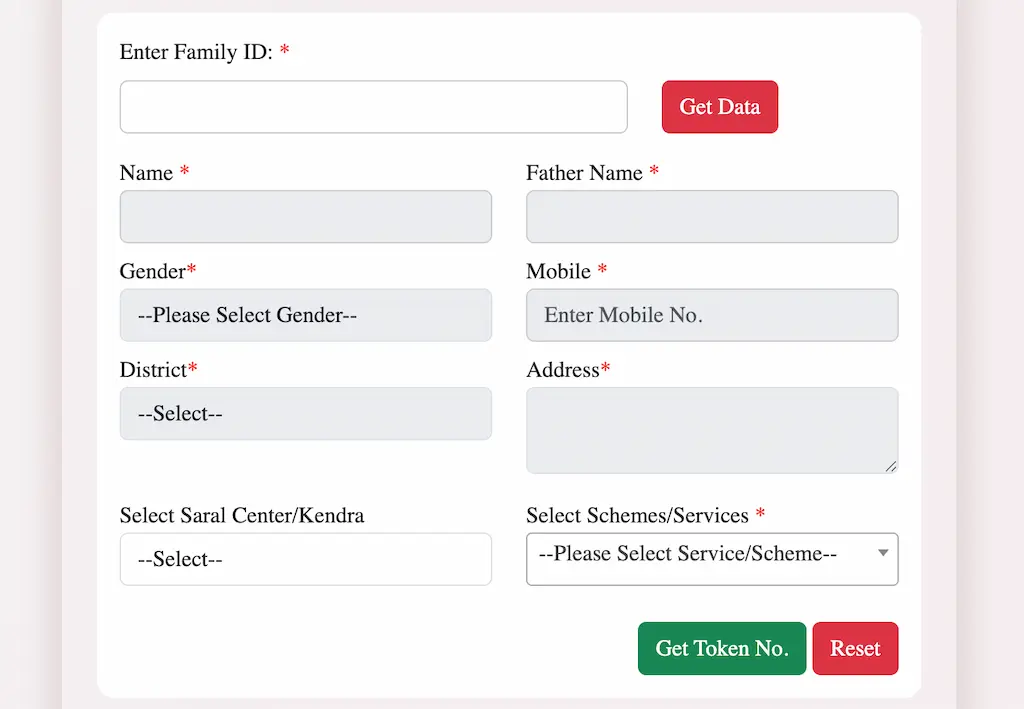
- Select the required Scheme/Service from the dropdown.
- Click "Get Token No." to generate your token, print it and visit your nearest Saral Kendra.
How to Check Your Eligibility?
The portal provides an eligibility checker so you can find the right schemes before applying:
- On the homepage, click the "Check Eligibility" tab.
- Select parameters such as Gender, Age, Caste Category, Occupation, Annual Income, and Service / Scheme Sector.
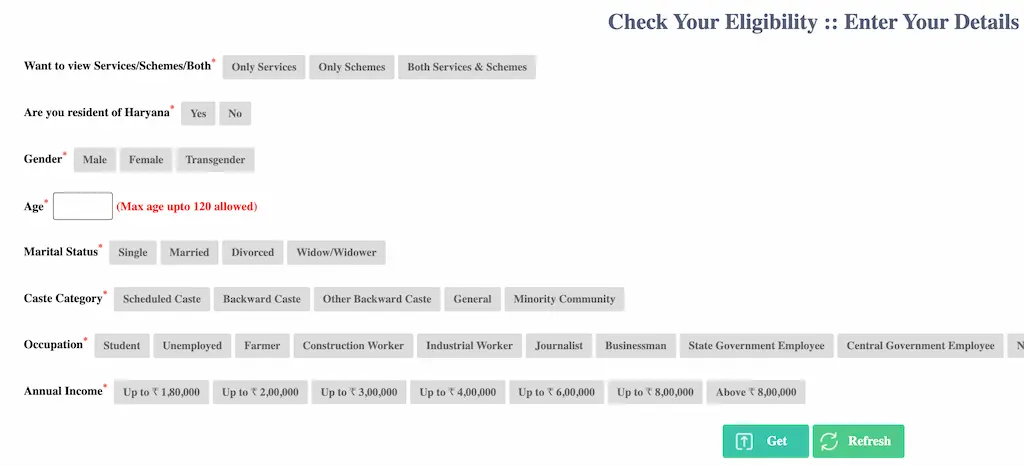
- Click "Get".
- A list of eligible services and schemes will appear based on your profile.
How to Register for Haryana Family ID?
You can register online from home, or get help at any SARAL Kendra or CSC center near you. Here is the step-by-step online process:
- Open the official portal: ppp-office.haryana.gov.in.
- Click "Citizen Login" on the homepage.
- When asked if you have a Family ID, choose "No" to start a new registration.
- Enter the Aadhaar number of the family head. An OTP will be sent to the Aadhaar-linked mobile number.
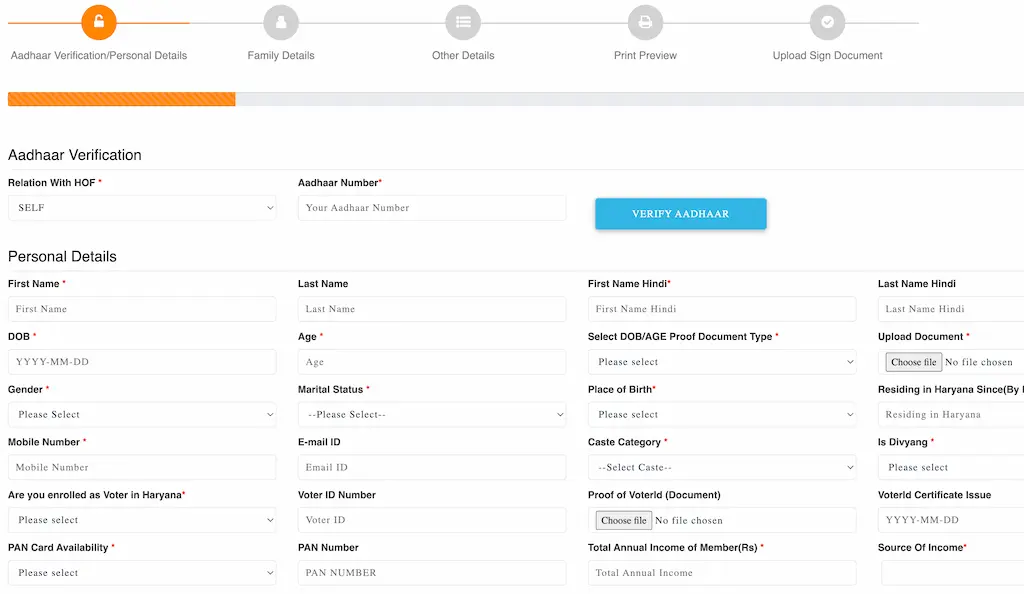
- Enter the OTP to verify. Your name, date of birth, and other basic details will be auto-filled from Aadhaar.
- Fill in the remaining details carefully – other family members' names, Aadhaar numbers, occupation, education level, income, and address.
- Upload the required documents (PDF, under 200 KB each).
- Review everything and click "Submit".
- You will get a Temporary Family ID (starting with "T") right away. Save this number – you will need it to track your application status.
How to Search Services on SARAL Haryana Portal?
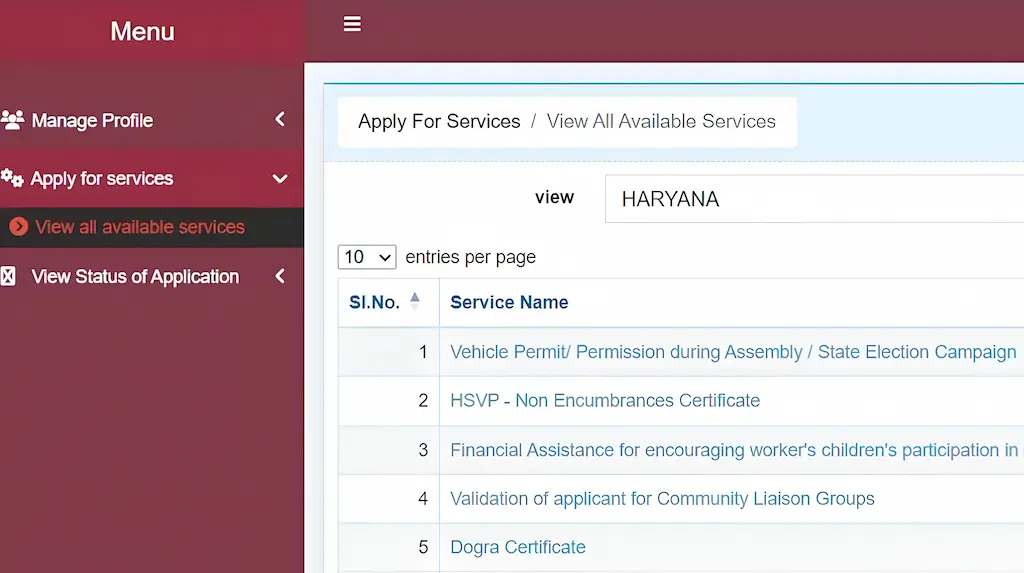
- Log in and click "Apply for Services" > "View All Available Services".
- Use the search bar to type a keyword (e.g., "income", "caste", "pension").
- Alternatively, filter by Department to browse all services under a specific department.
- Click "Apply" on any service to begin the application.
Popular Services on SARAL Haryana Portal
| Service / Scheme | Department |
|---|---|
| Income Certificate (Education Purpose) | Revenue & Disaster Mgmt. |
| Caste / Schedule Caste Certificate | Revenue & Disaster Mgmt. |
| Residence / Domicile Certificate | Revenue & Disaster Mgmt. |
| EWS (Economically Weaker Section) Certificate | Revenue & Disaster Mgmt. |
| OBC Certificate | Revenue & Disaster Mgmt. |
| Birth Certificate (Issuance / Non-Availability) | Health Services Dept. |
| Death Certificate (Issuance / Delayed Registration) | Health Services Dept. |
| Marriage Registration (Urban Area) | Citizen Resource Info. Dept. (CRID) |
| Old Age Samman Allowance (Widow & Destitute Women) | Social Justice & Empowerment |
| Permanent Driving License (RLA) | Transport Dept. – Sarathi |
Frequently Asked Questions
SARAL stands for Simple, All Inclusive, Real Time, Action Oriented, Long Lasting. It is the Haryana Government's unified portal for delivering citizen services digitally.
Yes, registration is required to apply for services and download certificates. However, application status can be tracked without logging in using the application reference number.
Common documents include Aadhaar Card, PPP ID, proof of residence, income certificate, caste certificate, and relevant service-specific documents. Requirements may vary depending on the service applied for.
Call the official helpline 1064 to report corruption complaints.
Yes. Send an SMS to 7738299899 in the format: SARAL [space] <Application ID> from any mobile number to receive the latest status update.
You can file an appeal directly on the SARAL portal or call the Antyodaya SARAL Helpline. If unresolved within 30 working days, the case auto-escalates to the Haryana Right to Service Commission.
The Family ID (Parivar Pehchan Patra – PPP) is a unique 8-digit number used to identify families and provide government services and benefits in Haryana.
Yes. All services are also available at SARAL Kendras located at the district, tehsil, and sub-division level. A Kendra operator will help you submit your application with your documents.
Yes, for many services such as Income Certificate and Caste Certificate, your Parivar Pehchan Number (PPN) is required and your details must be verified in the FIDR (Family ID Data Repository).
Call the Antyodaya SARAL Helpline at 0172-3968400 (Mon - Sat: 7:00 AM – 8:00 PM) for support. You can also raise a grievance directly through the portal's helpdesk section.
Helpline Number: 0172-3968400 (Mon - Sat: 7:00 AM – 8:00 PM)
Official Email: saral[dot]haryana[at]gov[dot]in
SMS Tracking: Send SARAL [Space] <Application ID> to 7738299899
Official Website: saralharyana.gov.in